 Flipwise
One clock, everywhere on your Mac.Một chiếc đồng hồ, ở mọi nơi trên máy Mac.
Pick a theme once. The desktop widget, the menu bar, your widgets and full screen all wear it.Chọn giao diện một lần. Widget trên desktop, thanh menu, widget hệ thống và chế độ toàn màn hình đều đổi theo.
Desktop widgetWidget trên desktop
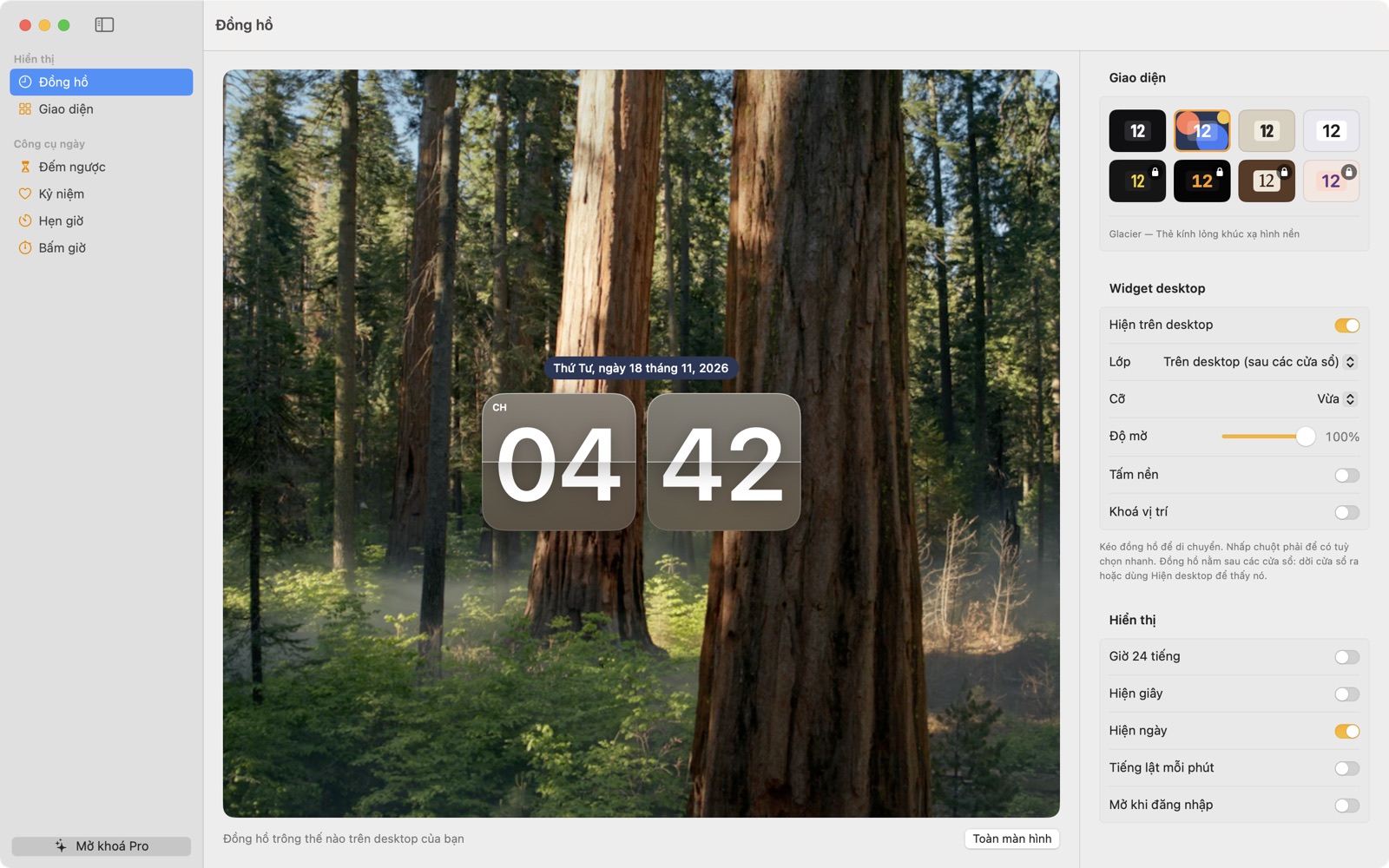
Floats above your windows or sits behind them. Resize it, set its opacity, lock it in place.Nổi trên các cửa sổ hoặc nằm phía sau. Bạn có thể đổi kích thước, chỉnh độ trong suốt và khoá vị trí.
Menu barThanh menu
The time, a running timer or a pinned countdown, always one glance away.Giờ, bộ hẹn giờ đang chạy hoặc một bộ đếm ngược đã ghim, chỉ cần liếc lên là thấy.
Wallpaper: photo by Kalen Emsley on UnsplashHình nền: ảnh của Kalen Emsley trên Unsplash
A focus timer that stays in sight.Hẹn giờ tập trung, luôn trong tầm mắt.
Presets for work, breaks, tea and meetings, a stopwatch with laps, and the time left in your menu bar while you work.Có sẵn các mốc hẹn giờ cho làm việc, nghỉ giải lao, pha trà và họp, cùng đồng hồ bấm giờ có ghi vòng. Khi bạn làm việc, thời gian còn lại hiện ngay trên thanh menu.
Try it: press Start and watch the menu bar.Thử ngay: bấm Bắt đầu rồi nhìn thanh menu.
Widgets for the desktop and Notification Center.Widget cho desktop và Trung tâm thông báo.
Clock, countdown and anniversary widgets in small and medium sizes, drawn in the same material as the clock.Widget đồng hồ, đếm ngược và kỷ niệm, cỡ nhỏ và vừa, cùng chất liệu với đồng hồ.
Count down to Tết. Count up from the days you keep.Đếm ngược tới Tết. Đếm lại những ngày đáng nhớ.
Countdowns for trips and birthdays, and days-since counters for anniversaries, right beside the clock.Ngay cạnh đồng hồ là bộ đếm ngược cho chuyến đi, sinh nhật, và bộ đếm số ngày từ các cột mốc kỷ niệm.
- Enter a date by lunar day and month, leap months included.Nhập thẳng ngày âm, kể cả tháng nhuận.
- Flipwise finds the solar day every year and shows its Can Chi name.Mỗi năm Flipwise tự tính ra ngày dương lịch và ghi kèm tên năm Can Chi.
- Reminders arrive the day before and on the day.Nhắc trước một ngày và đúng ngày.
Full screen turns a spare display into a clock.Toàn màn hình biến màn hình phụ thành đồng hồ.
Put a bedside Mac or a second monitor to work after hours. Amber Night keeps the glare low.Dùng chiếc Mac đầu giường hay màn hình phụ sau giờ làm. Amber Night giữ ánh sáng dịu, ít chói.
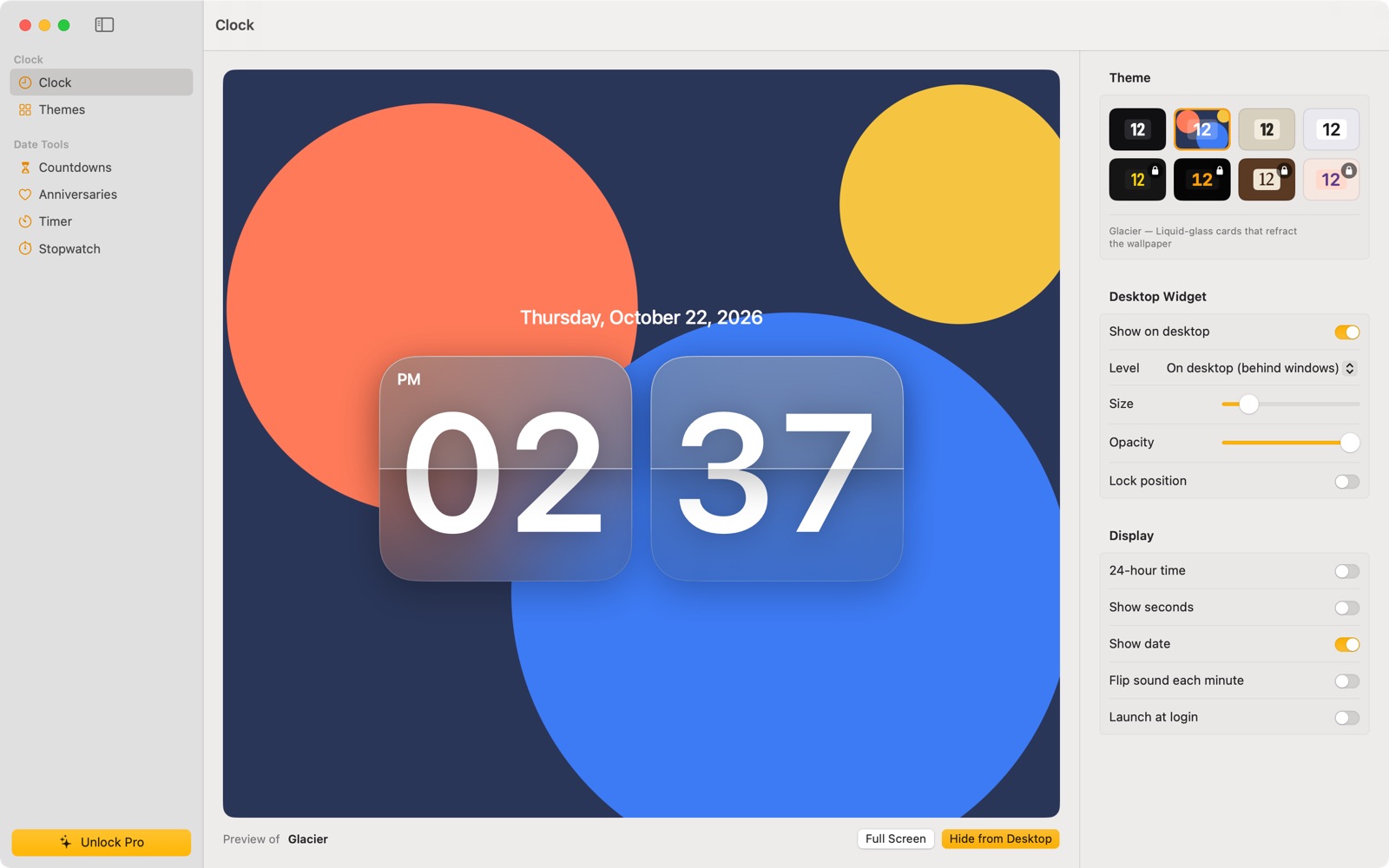
The real app, as it ships.Ứng dụng thật, đúng như bản phát hành.
Straight from Flipwise on the Mac App Store, no mock-ups.Ảnh chụp thẳng từ Flipwise trên Mac App Store, không dựng lại.
Free for good. Pro is $1.99, once.Miễn phí mãi mãi. Pro chỉ $1.99, một lần.
Everything you need is free. Pro adds four themes now and every Pro theme released later.Mọi thứ bạn cần đều miễn phí. Pro thêm bốn giao diện ngay bây giờ và mọi giao diện Pro ra mắt sau này.
FreeMiễn phí
Classic, Glacier, Paper and Minimal, with every tool.Classic, Glacier, Paper và Minimal, kèm mọi công cụ.
Pro
Split-Flap, Amber Night, Walnut and Pastel, plus every Pro theme added later. Choose one to see it at the top and the bottom of the page.Split-Flap, Amber Night, Walnut và Pastel, cùng mọi giao diện Pro ra mắt sau này. Chọn một giao diện để xem ở đầu và cuối trang.
No subscription, no ads, no data collected. Your local price is shown in the App Store.Không thuê bao, không quảng cáo, không thu thập dữ liệu. Giá tại Việt Nam do App Store hiển thị.
Questions, answered.Câu hỏi thường gặp.
Is Flipwise really free?Flipwise có thật sự miễn phí không?
Yes. The flip clock, countdowns, anniversaries, lunar dates, timer, stopwatch, widgets, menu bar and full screen are all free, with four themes: Classic, Glacier, Paper and Minimal.Có. Đồng hồ lật, đếm ngược, ngày kỷ niệm, âm lịch, hẹn giờ, bấm giờ, widget, thanh menu và toàn màn hình đều miễn phí, kèm bốn giao diện: Classic, Glacier, Paper và Minimal.
What does Flipwise Pro add?Flipwise Pro có thêm gì?
Four more themes (Split-Flap, Amber Night, Walnut and Pastel) and every Pro theme released later. It is a single in-app purchase: $1.99 on the US App Store, with your local price shown in the App Store. No subscription.Thêm bốn giao diện (Split-Flap, Amber Night, Walnut và Pastel) và mọi giao diện Pro ra mắt sau này. Bạn mua một lần ngay trong ứng dụng, giá $1.99 tại App Store Mỹ; ở Việt Nam, App Store hiện giá theo khu vực. Không có thuê bao.
How do lunar dates work?Âm lịch hoạt động thế nào?
Enter a date by lunar day and month, leap months included, and choose to repeat it every lunar year. Flipwise works out the solar date each year and shows the Can Chi name, so Tết, lunar birthdays and giỗ land on the right day.Bạn nhập ngày và tháng âm, kể cả tháng nhuận, rồi chọn lặp lại theo năm âm lịch. Mỗi năm Flipwise tự tính ra ngày dương lịch và hiện tên năm Can Chi, nên Tết, sinh nhật âm và ngày giỗ luôn rơi đúng ngày.
Which Macs does it run on?Flipwise chạy trên máy Mac nào?
Any Mac with macOS 14 Sonoma or later. Flipwise is a Mac app; there is no iPhone or iPad version.Mọi máy Mac chạy macOS 14 Sonoma trở lên. Flipwise là ứng dụng cho Mac, không có bản cho iPhone hay iPad.
Does Flipwise collect my data?Flipwise có thu thập dữ liệu của tôi không?
No. There is no account and no tracking, and your events stay on your Mac. The App Store lists Flipwise as Data Not Collected.Không. Không cần tài khoản, không theo dõi, và mọi sự kiện của bạn nằm trên máy Mac. Trên App Store, Flipwise được ghi là “Không thu thập dữ liệu”.
I bought Pro on another Mac. How do I get it here?Tôi đã mua Pro trên máy Mac khác, làm sao dùng ở máy này?
Sign in with the same Apple ID and choose Restore Purchases in the app.Đăng nhập bằng cùng Apple ID, rồi chọn Khôi phục giao dịch trong ứng dụng.
Put a better clock on your Mac.Đặt một chiếc đồng hồ đẹp lên máy Mac của bạn.
Classic is waiting for you in the app.Classic đang chờ bạn trong ứng dụng. It is a Pro theme: download free, then unlock Pro for $1.99, once.Đây là giao diện Pro: tải ứng dụng miễn phí, rồi mở khoá Pro với $1.99, trả một lần.




Free · Pro $1.99 once · macOS 14 Sonoma or later · No account · No data collectedMiễn phí · Pro $1.99 một lần · macOS 14 Sonoma trở lên · Không cần tài khoản · Không thu thập dữ liệu